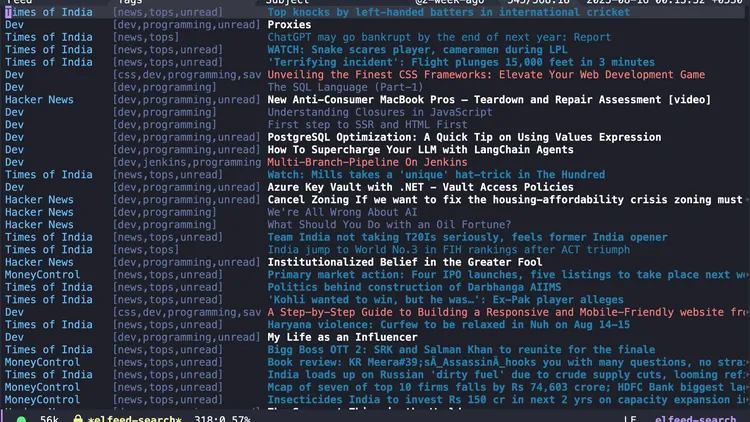
Syncing your Elfeed saves between multiple systems
Introduction
I recently started using Emacs with Doom Emacs as my primary text editor. I’ve been using VSCode for years, but I’ve always been curious about Emacs and I wanted to give it a try. I’m still exploring different modules, and I’m really enjoying the beginner’s keybindings<SPC> h r r and <SPC> q R. I was in an endless loop of searching for a good RSS reader for my needs. I tried some Android-based, web-based, and desktop-based readers, but I couldn’t find one that satisfied my need.
I wanted a reader that I can switch to easily in my free time. I wanted a reader that I can sync b/w my devices (which doesn’t include mobile devices as I don’t use them for reading). I wanted a reader that can tag my feeds according to my customizations. And most important of all, I wanted a simple reader that doesn’t have a lot of features that I don’t need.
I found Elfeed to be the best RSS reader for my needs. It’s simple, it’s fast, it’s customizable, and it’s easy to switch to whenever you’re free.
The only thing that I didn’t like about Elfeed is that it doesn’t have a built-in way to sync your feeds between multiple systems. But there are some workarounds that you can use to sync your feeds.
Data storage in Elfeed
Let’s first understand how Elfeed stores your data.
Data storage location
By default, Elfeed stores your data inside ~/.elfeed directory. You can change this location by setting the elfeed-db-directory variable.
I’m using Doom Emacs, so I set this variable inside my config.el file. You can do the same with your installation depending on what package manager you use.
(after! elfeed
  (setq elfeed-db-directory "~/.elfeed-data"))
)
Data storage format
ls -la ~/.elfeed-data
drwxrwxrwx  106 shubham.kumar  1729907015    3392 Aug 15 22:28 data
-rwxrwxrwx@   1 shubham.kumar  1729907015  924723 Aug 15 22:52 index

ls -a ~/.elfeed-data/data
00    21    37  ...  f0
06    24    3c  ...  f2
09    27    3e  ...  ff

ls ~/.elfeed-data/data/00
00e8db47f3a5b93b0fbb9b4c31748f607ae7bae5
The index file is a binary file that contains the metadata of your feeds. The metadata includes the title, link, tags, etc. This means that the index file contains the data that you see when you open Elfeed in Emacs.
The data directory contains the actual data of your feeds which are your list of blogs. The data directory contains the hash of the feed as the name of the file.
And just like git file storage, the data directory contains subdirectories named with the first two characters of the hash and the rest of the hash as a subdirectory inside that.
For more detailed information about the data storage format, you can check the docs by the creator, Chris Wellons.
What to sync?
Looking at the storage format of Elfeed, we can say that we can sync our feeds by syncing the index file and the data directory. But the data file will be generated based on your feeds, so we don’t need to sync it if you are already syncing your list of blogs.
Plus comparing the size of org file (1.6K) and data directory (3.3K), we can see that the data directory is much larger than the org file. So I think it’s better to sync the index file and the org file that contains your list of blogs than to sync the entire elfeed-data directory.
ls -lh ~/.elfeed-data/
total 1808
drwxrwxrwx  106 shubham.kumar  1729907015   3.3K Aug 15 22:28 data
-rwxrwxrwx@   1 shubham.kumar  1729907015   903K Aug 15 22:52 index

ls -lh ~/Documents/org/elfeed.org
-rwxrwxrwx  1 shubham.kumar  1729907015   1.6K Aug 13 08:00 /Users/shubham.kumar/Documents/org/elfeed.org
For me, I’m using org-mode to store my list of blogs that are being synced using version control. So whenever I start using Emacs on my other system, I always update the org files. This ensures my list of blogs is always up to date.
So the only thing I need now is to sync the metadata of my feeds. And for that, I’m using Syncthing.
Syncing with Syncthing
My current setup
I have 2 systems that I use regularly.
- My primary system is my
Linux Mintsystem which I use for personal stuff. - My secondary system is my
MacBook Air M1which I use for work.
On both systems, I use Doom Emacs and Elfeed.
Initial syncing (Syncthing on both systems)
I installed Syncthing on both systems and added the ~/.elfeed-data directory to the sync list while ignoring the data directory.
You may also add the
orgfiles that contain my list of blogs to the sync list but I am usinggitfor that.
The problem with this approach
There are times when my work system and my personal system are not running at the same time. Meaning, my personal system is turned off while I’m working on my work system. And vice versa.
This happens because I don’t work much on my work system on weekends and I don’t work on my personal system on some weekdays. So there are instances where my systems are not running at the same time. This means that Syncthing is not running on both systems at the same time. Hence, the index file is not synced between the systems. And when I change my feeds on one system, the changes are not reflected on the other system. And Syncthing gives me a conflict when I start Syncthing on both systems after this.
Second approach (Introducing a third system)
To solve this problem, We’ll need a third system that will work as a bridge between the two systems when one of them is offline.
The third system can be a server or a Raspberry Pi, dropbox or any other system that is always running (maybe your mobile phone).
I went with the cheapest option, my phone (Android). I installed Syncthing on my phone and added the ~/.elfeed-data directory to the sync list while ignoring the data directory. I added both systems to sync with my phone and with each other.
Even when one of the systems is turned off, the other is syncing with the third system. When the first system is back online it will sync with the phone even when my second system is offline. This ensures always synced Elfeed on both systems
This ensures that whenever one of my systems is offline, the other system can sync with my phone. And when both systems are online, they can sync with each other or my phone. This will ensure that the index file is always synced between the systems.
Problem with this approach
The problem with this approach is that I now have to dedicate some amount of storage to my index file. So I now have an unutilized index file on my phone which is taking up space. And I have to make sure that my phone is always connected to the internet and is always running Syncthing. This will also impact my battery life.
I have to check how much effect this has on my battery life (will update the blog after calculating this).
Best approach (Using Raspberry Pi)
I haven’t implemented this yet, but I think this is the best approach. If I get any problem with my current setup, I’ll implement this.
I’ll buy a Raspberry Pi and install Syncthing on it. I’ll add the ~/.elfeed-data directory to the sync list while ignoring the data directory. I’ll add both systems to sync with my Raspberry Pi and with each other. I’ll ensure that my Raspberry Pi is always connected to the internet and is always running Syncthing. I’ll also have to port forward my Raspberry Pi so that I can access it from outside my network. For this, I may need to talk to my ISP about static IP and port forwarding capabilities.
Will write a blog about this if I implement this.
Conclusion
In this post, I talked about how I sync my Elfeed feeds between my systems. I talked about the data storage format of Elfeed and how I sync my feeds using Syncthing. I also talked about the problems with my current setup and how I can improve it by introducing a new system to sync files. If you are using Emacs, I highly recommend you try Elfeed as your RSS reader. And if you are already using Elfeed, I hope this post helps you to sync your feeds between your systems.